
How to Turn Off the Seatbelt Reminder Beep on Suzuki Swace (2026)
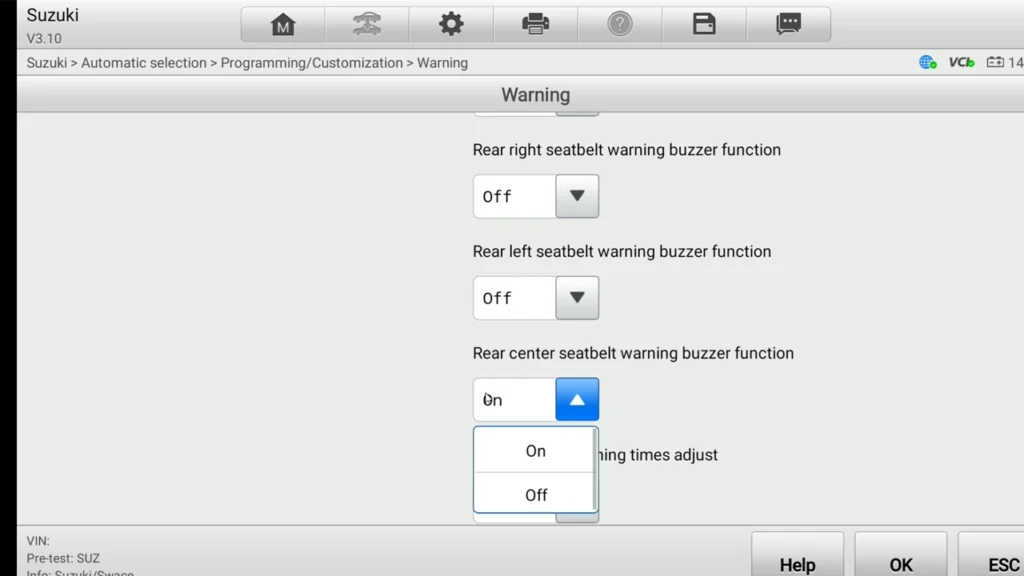

Quick answer: Connect, let it read the VIN, confirm the spec fields. Then go to Programming/Customization → Warning, find the seatbelt reminder settings (they’re listed per seat), set the seats you want silenced to OFF, leave the rest ON, and press OK to save.
I earn from qualifying purchases and sometimes get tools for free (full disclosure). It never affects my scoring.
Used tool in this guide

Video: How to turn off the seatbelt beep on Suzuki Swace 2026
This video shows how to read the vehicle, open the customization menu, and switch the rear seatbelt reminders off while leaving the front belts active.
Technical overview
| Item | Details |
|---|---|
| Vehicle | Suzuki Swace (Toyota Corolla Touring Sports hybrid) |
| Year | 2026 |
| System | Body / customization (seatbelt reminder) |
| Procedure type | Customization / comfort setting |
| Difficulty | Easy |
| Time required | ~5-10 min |
| Prerequisites | Battery healthy, ignition ON, customer’s seat-by-seat preference confirmed |
Step-by-step procedure
- Plug the Autel IM608 into the OBD port and select Suzuki.
- Let it auto-read the VIN. On this one it pulled the vehicle automatically, so you don’t have to drill through menus by hand.
- Confirm the spec fields. The scanner asked me to verify the vehicle info: Destination, Model name (Swace), Model code (ZWE213), Engine type (2ZR-FXE), Manufacturer (TMMT/Turkey), Cruise type. Pick what matches. Anything I wasn’t sure of I just picked the closest option, and for a customization function like this it doesn’t matter much, the menu is the same regardless. Press OK.
- Go into Programming/Customization in the menu.
- Open the Warning category. The seatbelt reminder settings live here.
- Set the chime per seat. The settings are listed for each seat separately. In my case the customer only wanted the rear belts silenced, so I switched the rear seats to OFF and left the front seats ON. Set whatever combination the customer asked for.
- Press OK to save. Cycle the ignition and check, the silenced belts should no longer chime while the ones left ON still do.
Additional Information & Compatibility Notes
Before using or purchasing any diagnostic tool for this procedure, always verify compatibility with your exact vehicle model, year and system configuration. Supported functions may vary depending on software version, hardware revision and regional limitations.
Alternative tools
Legal & safety notice
This procedure modifies vehicle system settings through the control module. Incorrect use may cause faults or warning lights. Always ensure the vehicle is secured and follow proper safety procedures.
More procedures like this
 VW Passat B7 Disable Seatbelt Warning: Do It in Long Coding, Not Adaptation
 Škoda Kodiaq 2023: How to Disable the Seatbelt Warning Chime
 How to Deactivate Seatbelt Warning Chime on Skoda Octavia Mk2 (2009)
 How to disable seatbelt chime on Mercedes C-Class W204 2008
Procedures tested with this scanner
 How to Read the Immo Code (Car Pass) from an Opel / Vauxhall Immo 2
 VW Passat B7 2013 2.0 TDI: Forced DPF Regeneration Through OBD2
 How to Enable Window Up/Down from the Key on Suzuki Swace (2026)
 Toyota Proace City EPB Reset for Brake Pad Replacement (2020)
Most popular OBD2 guides








Hi, I am Juraj Lukacko. I got frustrated by unhelpful and scammy mechanics, so I decided to learn everything about car diagnostics myself. I test dozens of new car diagnostic tools every month along with learning new strategies to fix and customize cars.

Responses