
How to Enable Coming Home & Leaving Home Lights (VAG Coding Guide)
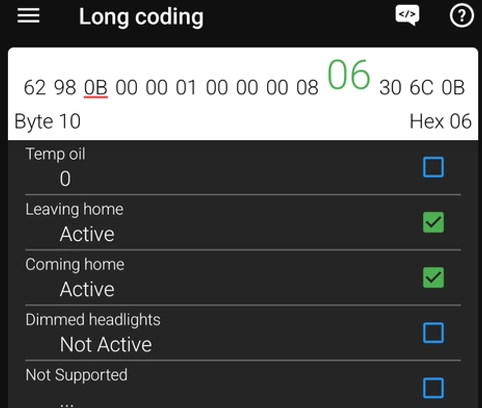

This guide shows how to enable Coming Home and Leaving Home lights using long coding and adaptation in VAG vehicles (VW, Audi, Skoda, Seat).
Affiliate Disclosure: iamcarhacker.com is an Amazon and other affiliate programs Associate. As an Amazon Associate, I earn from qualifying purchases. Full Affiliate disclosure.
Used tool in this guide
Video: How to Enable/Disable Coming Home & Leaving Home Lights
This video shows how to enable or disable Coming Home and Leaving Home lights step by step using long coding and adaptation in VAG vehicles.
Supported vehicles
| Vehicle |
|---|
| most vag models |
Technical overview
| Item | Details |
|---|---|
| Vehicle | Most VAG vehicles |
| Year | 2005+ (varies by BCM) |
| System | 09 (central electrics) |
| Procedure type | Coding / Adaptation |
| Difficulty | Easy |
| Time required | ~5 minutes |
| Prerequisites | ⚠️ Vehicle must have headlight switch with AUTO position. |
Step-by-step procedure
- Connect your diagnostic tool and open Central Electronics (module 09).
- Go to Long Coding.
- Open Byte 10 and activate both Leaving home and Coming home. In your example, Byte 10 changed from 00 to 06 after enabling both functions.
- Open Byte 13 and change the Coming/Leaving Home variant. In your example, the value changed from 0B to 4B, which switched the variant from Fog lights to Low beam.
- Save the long coding.
- Go to Adaptation.
- Find Coming home time and set the desired value. In your example, it was changed from the default 15 seconds up to 60 seconds.
- Find Leaving home time and set the desired value. In your example, the default value was 15 seconds and can also be increased up to 60 seconds.
- Save the adaptation changes.
- Test the function by locking and unlocking the vehicle. The lights should activate automatically.
Additional Information & Compatibility Notes
Before using or purchasing any diagnostic tool for this procedure, always verify compatibility with your exact vehicle model, year and system configuration. Supported functions may vary depending on software version, hardware revision and regional limitations.
Alternative tools
Related guides & background information
Legal & safety notice
This procedure modifies vehicle system settings through the control module. Incorrect use may cause faults or warning lights. Always ensure the vehicle is secured and follow proper safety procedures.
More procedures like this
 Activate Cornering Lights (Fog Lights) – Skoda Rapid 2019
 How to activate US-style turn signals for VAG / Volkswagen / Skoda / Seat / Audi
Procedures tested with this scanner
Activate Cornering Lights (Fog Lights) – Skoda Rapid 2019 Activate Hill Start Assist – Skoda Rapid 2015
 How to adapt a new battery in VW / Audi / Skoda / Seat (VAG battery coding guide)
 How to disable seatbelt warning in VW/Audi/Skoda/Seat
Most popular OBD2 guides








Hi, I am Juraj Lukacko. I got frustrated by unhelpful and scammy mechanics, so I decided to learn everything about car diagnostics myself. I test dozens of new car diagnostic tools every month along with learning new strategies to fix and customize cars.

Responses