
How to Check Real Mileage – Skoda Rapid 2019 (OBD2)
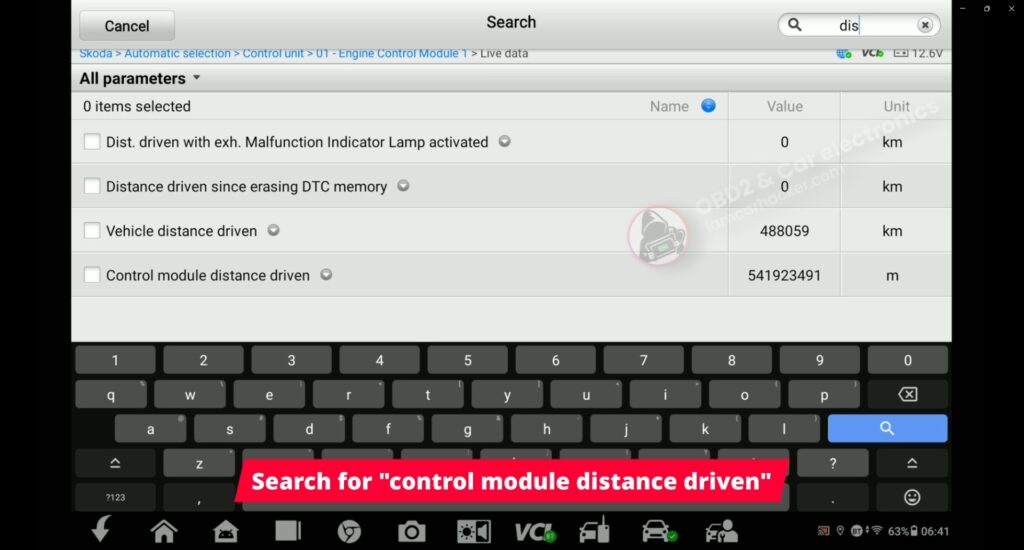

Check real vehicle mileage by comparing values from multiple control modules and verifying hidden mileage stored in the engine control unit.
I earn from qualifying purchases and sometimes get tools for free (full disclosure). It never affects my scoring.
Used tool in this guide

Supported vehicles
| Vehicle |
|---|
| rapid-nh |
Video: How to verify mileage with OBD2 scanner (Skoda/VAG)
This video shows how to erify the actual mileage on a Skoda Rapid by comparing values from multiple control modules and checking the distance stored inside the engine control unit.
Technical overview
| Item | Details |
|---|---|
| Vehicle | Skoda Rapid |
| Year | ~2013–2020 |
| System | Multiple control modules |
| Procedure type | Mileage verification |
| Difficulty | Easy |
| Time required | ~2–5 minutes |
| Prerequisites | Ignition ON |
Step-by-step procedure
1. Connect and identify the vehicle
Connect the scanner to the OBD2 port, turn the ignition ON, and enter diagnostics. Select Skoda and use automatic vehicle detection.
2. Check mileage using Service function
From the main menu, open the Service section and select Odometer.
The scanner reads mileage values stored in multiple control modules.
On this vehicle, the values were:
- Engine control module: 488,059 km
- Instrument cluster: 488,059 km
- Power steering: 488,059 km
At this point, everything appears consistent.
3. Access engine control module
Go back to diagnostics, open Control Units, and enter the engine control module (01 – Engine).
4. Open live data and locate distance parameter
Enter Live Data and search for the parameter “control module distance driven”.
This parameter is not shown in the basic mileage function and must be accessed manually.
5. Read and interpret the value
The engine control module reports the distance in meters.
Value recorded in this case:
- 541,923,491 m
Converted to kilometers:
- 541,923 km
6. Compare values
Dashboard and service function:
- 488,059 km
Engine control module (live data):
- 541,923 km
Difference:
- Approximately 50,000 km
Result
The mileage stored inside the engine control unit is significantly higher than the value shown on the dashboard and in other modules.
This indicates that the displayed mileage has likely been altered.
Additional Information & Compatibility Notes
Before using or purchasing any diagnostic tool for this procedure, always verify compatibility with your exact vehicle model, year and system configuration. Supported functions may vary depending on software version, hardware revision and regional limitations.
Alternative tools
- XTool A30M
- Mucar 892BT
- Youcanic U-CAN II
- OBDeleven
- Best Bi-Directional OBD2 scanners
- Best VAG OBD2 scanners
Legal & safety notice
This procedure modifies vehicle system settings through the control module. Incorrect use may cause faults or warning lights. Always ensure the vehicle is secured and follow proper safety procedures.
More procedures like this
 How to Check Real Car Mileage With an OBD2 Scanner
 Verifying real mileage on Skoda Octavia MK3– case study using OBD2 live data
Procedures tested with this scanner
 How to Read the Immo Code (Car Pass) from an Opel / Vauxhall Immo 2
 VW Passat B7 2013 2.0 TDI: Forced DPF Regeneration Through OBD2
 How to Enable Window Up/Down from the Key on Suzuki Swace (2026)
 How to Turn Off the Seatbelt Reminder Beep on Suzuki Swace (2026)
Most popular OBD2 guides








Hi, I am Juraj Lukacko. I got frustrated by unhelpful and scammy mechanics, so I decided to learn everything about car diagnostics myself. I test dozens of new car diagnostic tools every month along with learning new strategies to fix and customize cars.

Responses