
BMW E61 530d Oil Service Reset with OBD2 scanner
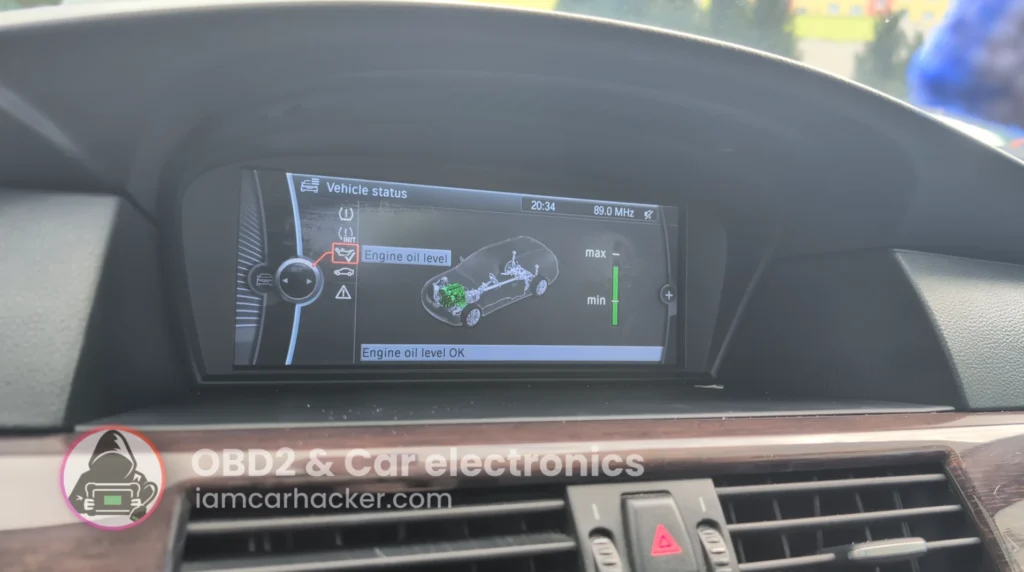

This is complete step-by-step procedure for resetting the engine oil service interval after oil change on BMW E60/E61 5-Series using a diagnostic scanner.
Affiliate Disclosure: iamcarhacker.com is an Amazon and other affiliate programs Associate. As an Amazon Associate, I earn from qualifying purchases. Full Affiliate disclosure.
Used tool

Video: How to reset oil service in BMW 5 E60/61
This video shows how to reset oil service in BMW 5 E60/61
Technical overview
| Item | Details |
|---|---|
| Vehicle | BMW 5-Series E60 / E61 |
| Applicable models | ~2003–2010 (incl. 530d M57 & N57 early models) |
| System | CBS – Condition Based Service (oil service counter) |
| Difficulty | Easy |
| Time required | ~2–5 minutes |
| Prerequisites | Oil change completed, ignition ON, stable battery voltage |
How to reset oil service in BMW 5 E60/61
Step 1 — Prepare the vehicle
- Turn ignition ON (engine OFF).
- Connect MUCAR 892BT to OBD port.
- Open the diagnostic app and connect to vehicle.
Step 2 — Enter BMW service functions
- Select BMW → Automatic VIN or manual selection
- Enter:
Service Functions → Maintenance / CBS Reset → Engine Oil
(Some software versions show it as Oil Service Reset.)
Step 3 — Perform oil reset
- Select Reset engine oil interval
- Confirm reset when prompted
- Wait until tool shows Reset successful
Step 4 — Verify reset
- Turn ignition OFF
- Turn ignition ON again
- Check service menu in cluster
Oil service should now show:
- new interval (usually ~25–30k km or 24 months)
- oil service warning cleared
Alternative manual reset method (no scanner)
BMW E60/E61 also allows reset via cluster buttons.
- Ignition ON
- Hold trip reset button until service menu appears
- Scroll to engine oil symbol
- Hold button again to reset
- Confirm reset
Note:
Manual reset may be blocked if:
- oil service overdue too much
- CBS data corrupted
- battery voltage low
Scanner reset is more reliable.
Additional Information & Compatibility Notes
Before using or purchasing any diagnostic tool for this procedure, always verify compatibility with your exact vehicle model, year and system configuration. Supported functions may vary depending on software version, hardware revision and regional limitations.
Alternative tools
- XTool A30M
- Youcanic U-CAN II
- OBDeleven
- Best OBD2 scanners with ECU coding
- Best Bi-Directional OBD2 scanners
- Best OBD2 scanners overall
Related guides & background information
Legal & safety notice
Service reset should only be performed after completing the required maintenance.
Resetting service intervals without replacing engine oil may result in incorrect maintenance tracking and potential engine damage.
Always verify oil level and condition after service.
More procedures like this
 BMW 3-series E46 (2005) – Oil Service Reset (With & Without OBD2 Scanner)
 Škoda Fabia Mk3 (2020) Oil Service Reset with OBD2 scanner
Procedures tested with this scanner
 How to Check Diesel Fuel Injectors (VW / Audi / Skoda / Seat) Using OBD2 Scanner
 Steering Angle Sensor Calibration (SAS Reset) – Honda Civic 2017
 How to Register and Code a New Battery on BMW E60/E61 (Fix Battery Drain & Charging Issues)
 How to open rear brake calipers for brake pad replacement in VW Passat B6 (EPB service mode)
Most popular OBD2 guides








Hi, I am Juraj Lukacko. I got frustrated by unhelpful and scammy mechanics, so I decided to learn everything about car diagnostics myself. I test dozens of new car diagnostic tools every month along with learning new strategies to fix and customize cars.

Responses