
How to open rear brake calipers for brake pad replacement in VW Passat B6 (EPB service mode)
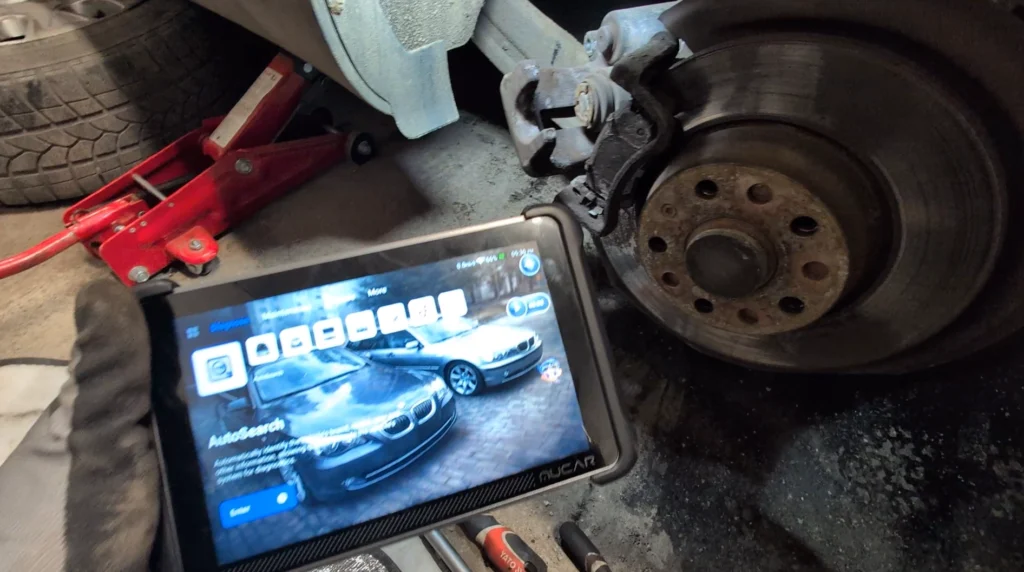

This is complete step-by-step procedure for opening the electronic parking brake (EPB) rear brake calipers in VW Passat B6 before replacing rear brake pads. Vehicles equipped with electronic parking brake require entering service mode so the brake pistons can retract electronically and allow installation of new brake pads.
Affiliate Disclosure: iamcarhacker.com is an Amazon and other affiliate programs Associate. As an Amazon Associate, I earn from qualifying purchases. Full Affiliate disclosure.
Used tool

Video: How to open EPB calipers in VW Passat B6
This video shows how to open electronic parking brake calipers using a diagnostic scanner and place the system into service mode before replacing rear brake pads.
Supported vehicles
| Vehicle |
|---|
| passat-b6 |
Technical overview
| Item | Details |
|---|---|
| Vehicle | VW Passat B6 (2005 – 2010) |
| Applicable models | VW Passat B6 (2005–2010) with electronic parking brake (EPB) |
| System | Parking Brake Control Module (53) |
| Difficulty | Easy |
| Time required | ~5–10 minutes |
| Prerequisites | Ignition ON, parking brake released, diagnostic scanner connected, 12V+ voltage |
How to open electronic parking brake calipers in VW Passat B6
- Connect your OBD2 diagnostic scanner to the vehicle.
- Turn ignition ON (engine OFF).
- Make sure the electronic parking brake is released.
- Connect to the vehicle using Auto Scan / Auto Search.
- Enter control module: 53 – Parking Brake
- Open service functions / brake service mode.
- Select Open brake calipers (or similar EPB service function).
- The parking brake motors will retract the pistons automatically.
- After the pistons are retracted, you can remove the brake calipers and replace the rear brake pads. (turn ignition OFF before if scanner instructs you to do so)
How to close brake calipers after pad replacement
After installing new brake pads, the electronic parking brake must return to normal operating position.
- Turn ignition ON.
- Connect the diagnostic scanner again.
- Enter module:
53 – Parking Brake
- Select Close brake calipers.
- The EPB motors will move the pistons back into operating position.
- Press the brake pedal several times to seat the brake pads.
Additional Information & Compatibility Notes
Before using or purchasing any diagnostic tool for this procedure, always verify compatibility with your exact vehicle model, year and system configuration. Supported functions may vary depending on software version, hardware revision and regional limitations.
Alternative tools
- XTool A30M
- Youcanic U-CAN II
- OBDeleven
- Thinkscan 689BT
- Thinkdiag2
- XTool D8s
- Best Bi-Directional OBD2 scanners
Related guides & background information
Legal & safety notice
This procedure modifies the electronic parking brake system through the vehicle control unit. Incorrect use may cause parking brake faults, warning lights or improper brake operation. Always ensure the parking brake is released and the vehicle is safely secured before performing this procedure. If unsure, consult service documentation or a qualified technician.
Procedures tested with this scanner
 How to Check Diesel Fuel Injectors (VW / Audi / Skoda / Seat) Using OBD2 Scanner
 Steering Angle Sensor Calibration (SAS Reset) – Honda Civic 2017
 How to Register and Code a New Battery on BMW E60/E61 (Fix Battery Drain & Charging Issues)
 How to adapt remote key fob on VW / Audi / Skoda / Seat (VAG)
Most popular OBD2 guides








Hi, I am Juraj Lukacko. I got frustrated by unhelpful and scammy mechanics, so I decided to learn everything about car diagnostics myself. I test dozens of new car diagnostic tools every month along with learning new strategies to fix and customize cars.

Responses