
How to adapt a new battery in VW / Audi / Skoda / Seat (VAG battery coding guide)
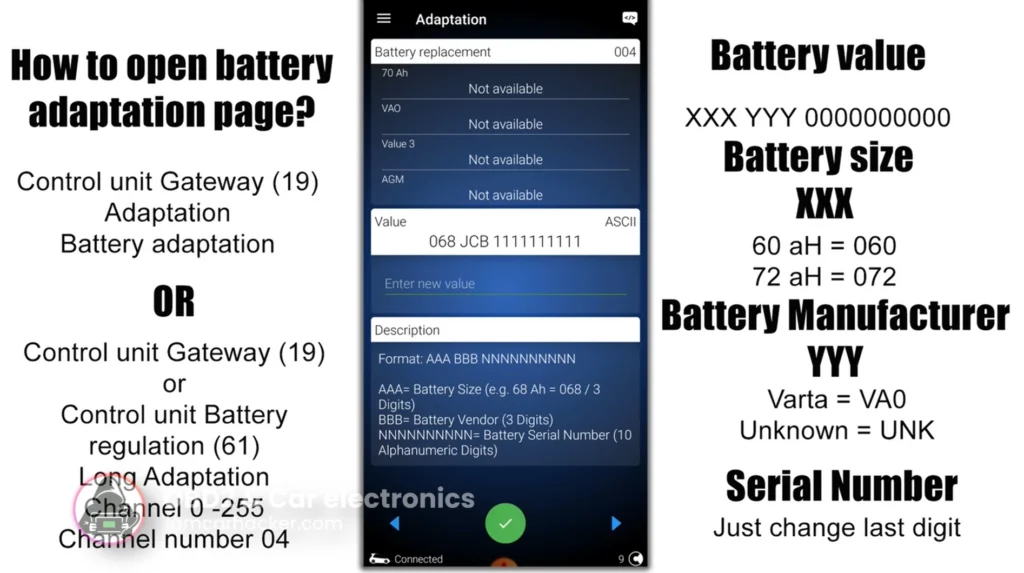

This is complete step-by-step procedure for registering or adapting a new battery in VAG vehicles after replacement, so the charging system, IBS, and energy management work correctly and the battery does not get over- or under-charged.
Affiliate Disclosure: iamcarhacker.com is an Amazon and other affiliate programs Associate. As an Amazon Associate, I earn from qualifying purchases. Full Affiliate disclosure.
Used tool
Video: How to adapt new battery in VAG car
This video shows how to open battery adaptation, change battery values and save coding in real diagnostic tool.
Technical overview
| Item | Details |
|---|---|
| Vehicle | VW / Audi / Skoda / Seat (VAG vehicles with energy management system) |
| Applicable models | Most VAG cars ~2007+ with battery monitoring (IBS / BEM system) |
| System | Gateway (19) / Battery regulation module (61) |
| Difficulty | Easy |
| Time required | ~5–10 minutes |
| Prerequisites | New battery installed, ignition ON |
✅ Do you NEED to adapt the battery?
✔ Cars that usually REQUIRE battery adaptation
Examples:
- VW Golf 6 / 7 / 7.5
- Passat B6 / B7 / B8
- Audi A4 B8 / A5 / A6 C7
- Skoda Octavia 2 facelift / Octavia 3
- Superb 2 / 3
- Seat Leon 2 facelift / Leon 3
👉 If the car has:
- start-stop
- intelligent charging
- IBS sensor on battery
- battery in trunk
→ it almost always needs coding.
❌ Cars that usually DO NOT require adaptation
Examples:
- VW Golf 4 / early Golf 5
- Passat B5
- Audi A3 8L
- older Skoda Fabia / Octavia 1
- small VAG cars without energy management
👉 These use classic alternator control → no battery coding.
✅ How to open battery adaptation page
There are two common ways depending on vehicle.
✔ Method 1 — Gateway module (most common)
- Connect diagnostic tool
- Select control unit:
19 – CAN Gateway
- Open:
Adaptation
- Find channel:
Battery adaptation (channel 04)
✔ Method 2 — Battery regulation module
Used on some Audi / newer models.
- Select control unit:
61 – Battery Regulation
- Open:
Adaptation
- Choose:
Channel 04 (Battery adaptation)
✅ How to enter new battery values
Battery coding string usually has format:
XXX YYY ZZZZZZZZZZ
Where:
- XXX = battery size
- YYY = manufacturer code
- ZZZZZZZZZZ = serial number
✔ Battery size codes
| Capacity | Code |
|---|---|
| 60 Ah | 060 |
| 68 Ah | 068 |
| 70 Ah | 070 |
| 72 Ah | 072 |
| 74 Ah | 074 |
| 80 Ah | 080 |
| 92 Ah | 092 |
| 95 Ah | 095 |
| 105 Ah | 105 |
| 110 Ah | 110 |
✔ Manufacturer codes
| Brand | Code |
|---|---|
| Varta | VA0 |
| Bosch | BO0 |
| Moll | MO0 |
| Banner | BA0 |
| Exide | EX0 |
| Johnson Controls | JC0 |
| Unknown | UNK |
If your battery brand is not listed → use UNK.
✔ Serial number
Two options:
Option A — enter real battery serial
(best but not required)
Read serial from battery label and enter it.
Option B — easiest method (most mechanics use this)
👉 Keep original coding
👉 Change only last digit
Example:
Old: 072 VA0 1234567890
New: 072 VA0 1234567891
This tells ECU:
✔ new battery installed
✔ resets charge history
✔ works perfectly
✅ Battery TYPE coding (Long Coding)
Some cars require setting battery type in long coding.
✔ AGM battery long coding
Typical values:
Byte 02 = Hex 18
Used for:
- AGM batteries
- start-stop systems
- higher energy demand
✔ EFB battery long coding
Typical values:
Byte 02 = Hex 78
Used for:
- EFB batteries
- mid-range start-stop vehicles
✔ Standard lead-acid battery
On some cars:
Byte 02 = Hex 08
(or default value)
⚠ Values vary slightly by ECU version,
but these are most common working examples.
✅ How to save the coding
- Enter new battery string
- Confirm adaptation
- Save coding
- Turn ignition OFF for 30 seconds
- Start engine
Energy management resets automatically.
✅ What happens if you DON’T adapt battery?
Possible issues:
- battery overcharging
- battery undercharging
- shorter battery life
- start-stop not working
- charging faults stored in ECU
Additional Information & Compatibility Notes
Before using or purchasing any diagnostic tool for this procedure, always verify compatibility with your exact vehicle model, year and system configuration. Supported functions may vary depending on software version, hardware revision and regional limitations.
Alternative tools
- Mucar 892BT
- Youcanic U-CAN II
- VCDS
- Best VAG OBD2 scanners
- Best OBD2 scanners with ECU coding
- Best Bi-Directional OBD2 scanners
- Best OBD2 scanners overall
Related guides & background information
Legal & safety notice
This procedure modifies vehicle control unit settings. Incorrect coding may cause charging system errors, warning lights or improper battery management. Always confirm correct battery capacity and type before saving values. If unsure, consult service documentation or qualified technician.
More procedures like this
Procedures tested with this scanner
 Activate Cornering Lights (Fog Lights) – Skoda Rapid 2019
 How to Enable Coming Home & Leaving Home Lights (VAG Coding Guide)
 Activate Hill Start Assist – Skoda Rapid 2015
 How to disable seatbelt warning in VW/Audi/Skoda/Seat
Most popular OBD2 guides








Hi, I am Juraj Lukacko. I got frustrated by unhelpful and scammy mechanics, so I decided to learn everything about car diagnostics myself. I test dozens of new car diagnostic tools every month along with learning new strategies to fix and customize cars.

Responses