
Citroën C4 Picasso 2012 Gearbox adaptation
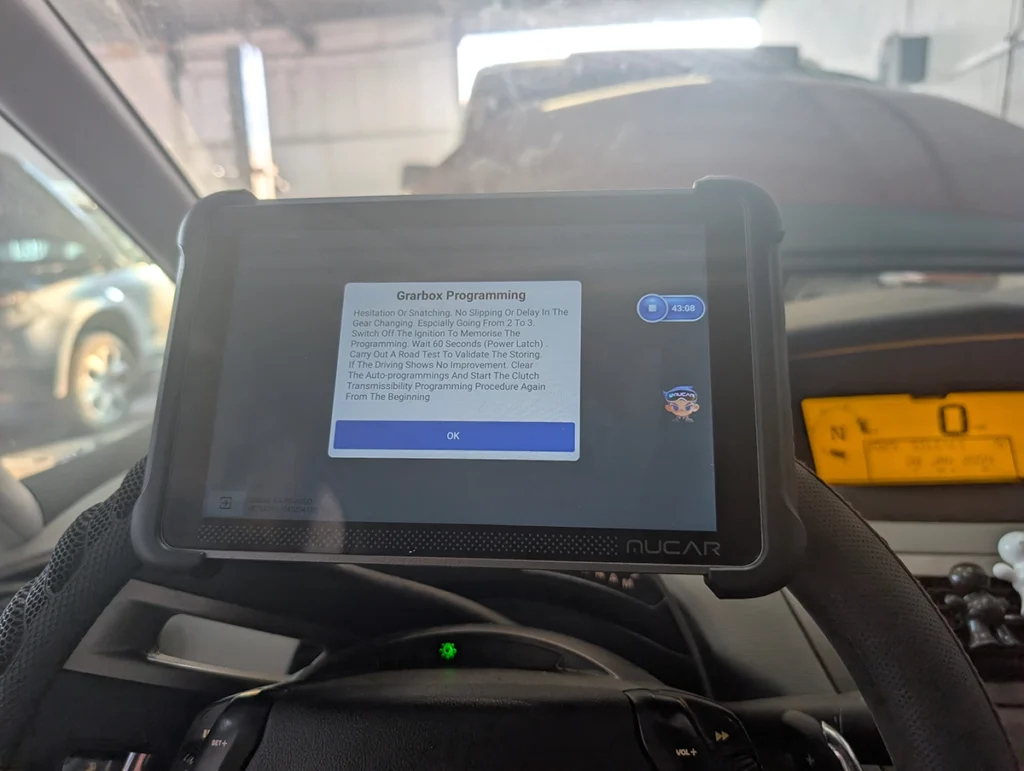

This guide shows how to perform a gearbox adaptation on a Citroën C4 Picasso (2012 automatic) using a diagnostic scanner.
The vehicle in this case had unstable idle RPM and poor shifting between 1st and 2nd gear after an engine and ECU replacement. Transmission diagnostics revealed that gearbox initialization had not been completed, which can cause drivability issues.
Affiliate Disclosure: iamcarhacker.com is an Amazon and other affiliate programs Associate. As an Amazon Associate, I earn from qualifying purchases. Full Affiliate disclosure.
Used tool in this guide

Video: Gearbox adaptation on Citroën C4 Picasso
This video shows the full gearbox adaptation procedure performed with the Mucar 892BT diagnostic scanner.
Supported vehicles
| Vehicle |
|---|
| c4-picasso-mk1 |
Technical overview
| Item | Details |
|---|---|
| Vehicle | Citroën C4 Picasso |
| Supported years | ~Citroen C4 Picasso Mk1 (2006–2013) |
| Engine | Diesel |
| Transmission | Automatic |
| System | Transmission control module |
| Procedure type | Gearbox adaptation |
| Difficulty | Medium |
| Time required | ~40–60 minutes |
| Prerequisites | Full system diagnostic scanner |
Reported symptoms
The vehicle arrived with the following issues:
- Unstable idle RPM fluctuating up and down
- Poor shifting between 1st and 2nd gear
- No fault codes stored in the engine ECU
However, the transmission control module stored the following faults:
P1800
Gearbox initialization incomplete or not performed.
P0949
Clutch initialization incomplete or not performed.
These faults indicated that the gearbox adaptation procedure had not been completed.
Initial diagnosis
Engine diagnostics showed no active engine faults.
Transmission diagnostics confirmed that gearbox adaptation was incomplete, most likely due to previous repairs.
Vehicle history included:
- Engine replacement
- Engine ECU replacement
- ECU software cloning from the original unit
- Software update after cloning
Because of these repairs, performing a gearbox adaptation procedure was the next diagnostic step.
Scanner access issue
During the first attempt, the scanner failed to access gearbox adaptation.
Even when the required conditions were met:
- ignition ON
- engine OFF
the scanner returned a communication failure message.
After checking for scanner updates, a Citroën software update was available.
Once the scanner software was updated and a new autoscan was performed, gearbox adaptation became available in the special functions menu.
Preconditions for gearbox adaptation
Before performing the procedure the following conditions were met:
- Stable battery voltage
- Engine at operating temperature
- No active gearbox fault codes preventing adaptation
- Vehicle stationary at the beginning of the procedure
Step-by-step procedure
Step 1 — Run a full system scan
Connect the diagnostic scanner and perform a full system autoscan.
Check the transmission control module for faults related to gearbox initialization.
Step 2 — Update scanner software if required
If gearbox adaptation is not available in the service menu, check for scanner software updates.
In this case, the procedure only became available after updating the scanner software and performing a new autoscan.
Step 3 — Start gearbox adaptation
Navigate to the gearbox service procedure in the scanner.
The scanner will guide the procedure through several ignition ON / ignition OFF confirmations.
During this phase, the gearbox may automatically cycle through gears while the vehicle is in neutral.
This indicates the adaptation procedure has started.
Step 4 — Engine idle learning phase
Start the engine and leave it idling for approximately 20 minutes without pressing the accelerator pedal.
This phase allows the engine ECU and transmission control module to stabilize baseline values.
Step 5 — First to second gear learning
Accelerate the vehicle so the transmission shifts from 1st gear to 2nd gear.
After the shift:
- Bring the vehicle to a complete stop
- Repeat the acceleration
This process should be repeated four times.
After completing the repetitions, leave the engine idling for approximately five minutes.
Step 6 — Repeat the learning cycle
Repeat the 1st to 2nd gear learning procedure several times to complete the adaptation process.
Step 7 — Drive cycle
Drive the vehicle in automatic mode and allow the gearbox to shift through all gears up to the highest gear available.
Drive normally so the control module can learn the correct shift parameters.
Step 8 — Save adaptation values
Turn the engine OFF and leave it off for approximately 60 seconds.
This allows the transmission control module to save the new adaptation values.
Additional Information & Compatibility Notes
Before using or purchasing any diagnostic tool for this procedure, always verify compatibility with your exact vehicle model, year and system configuration. Supported functions may vary depending on software version, hardware revision and regional limitations.
Alternative tools
Related guides & background information
Legal & safety notice
This procedure modifies vehicle system settings through the control module. Incorrect use may cause faults or warning lights. Always ensure the vehicle is secured and follow proper safety procedures.
Procedures tested with this scanner
 How to Check Diesel Fuel Injectors (VW / Audi / Skoda / Seat) Using OBD2 Scanner
 Steering Angle Sensor Calibration (SAS Reset) – Honda Civic 2017
 How to Register and Code a New Battery on BMW E60/E61 (Fix Battery Drain & Charging Issues)
 How to open rear brake calipers for brake pad replacement in VW Passat B6 (EPB service mode)
Most popular OBD2 guides








Hi, I am Juraj Lukacko. I got frustrated by unhelpful and scammy mechanics, so I decided to learn everything about car diagnostics myself. I test dozens of new car diagnostic tools every month along with learning new strategies to fix and customize cars.

Responses