
Skoda Rapid 2015 Odometer adjustment
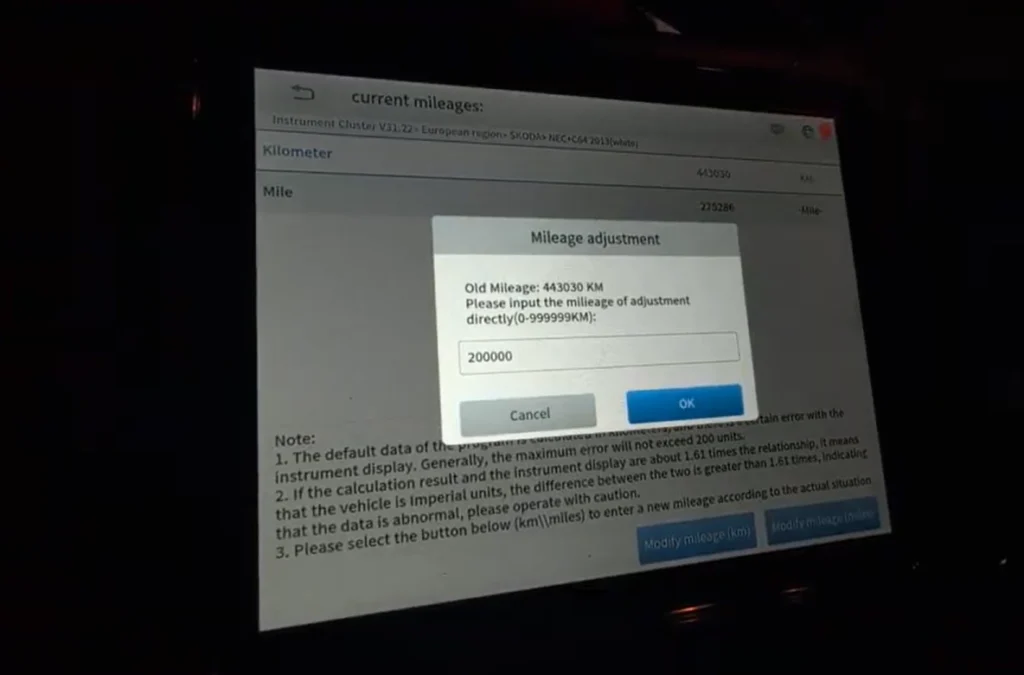

This is complete step-by-step procedure for correcting distance on odometer after instrument cluster replacement.
Affiliate Disclosure: iamcarhacker.com is an Amazon and other affiliate programs Associate. As an Amazon Associate, I earn from qualifying purchases. Full Affiliate disclosure.
Used tool

VIDEO: How to change mileage in Skoda Rapid 2015 (spaceback, TSI)
This video shows how to set correct mileage on instrument cluster with OBD2 scanner.
Technical overview
| Item | Details |
|---|---|
| Vehicle | Škoda Rapid TSI 2015 |
| Applicable models | Skoda rapid (2012 – 2019) with the same IC system |
| System | Instrument cluster |
| Difficulty | Easy |
| Time required | ~5 minutes |
| Prerequisites | Stable battery voltage |
How to change mileage in Skoda Rapid with OBD2 scanner (step-by-step)
- Connect diagnostic scanner to OBD2 port
- Open special functions menu -> Instrument cluster
- Select Europian region -> Skoda
- Select Rapid
- Switch ingition ON
- Make EEprom backup file inside scanner
- Go to mileage modify menu
- Scanner will display current mileage after a while
- Hit yes and enter new mileage “modify KM” or “modify Miles”
- Hit “Yes”
- Instrument cluster will turn off (black screen)
- Confirm screen is black in scanner
- Instruments will light up with new mileage value
Additional Information & Compatibility Notes
Before using or purchasing any diagnostic tool for this procedure, always verify compatibility with your exact vehicle model, year and system configuration. Supported functions may vary depending on software version, hardware revision and regional limitations.
Alternative tools
Related guides & background information
Legal & safety notice
When replacing an instrument cluster, it is important that the displayed mileage accurately reflects the vehicle’s true distance traveled. Always record the original mileage before removing the old cluster and keep clear documentation of the replacement process.
Mileage-related systems are regulated in many countries, so any synchronization or correction should only be done to match the vehicle’s actual, documented mileage. Never use this type of procedure to misrepresent a vehicle’s history.
Maintain transparent service records and follow local regulations to ensure the vehicle remains compliant and properly documented.
More procedures like this
 How to change mileage in Volkswagen Touareg 7L
 How to change mileage in Seat Leon Mk2 (1P) after instrument cluster replacement
 How to do odometer correction for Skoda Octavia MK1 with OBD2 scanner
 Volkswagen Golf MK5 2006 Odometer correction with OBD2 scanner
Procedures tested with this scanner
How to change mileage in Seat Leon Mk2 (1P) after instrument cluster replacement Volkswagen Golf MK4 1999 Odometer adjustment
 Chevrolet Malibu 2013 Odometer correction with OBD2 scanner
 How to add a new key – Volkswagen Golf MK5 (2006)
Most popular OBD2 guides








Hi, I am Juraj Lukacko. I got frustrated by unhelpful and scammy mechanics, so I decided to learn everything about car diagnostics myself. I test dozens of new car diagnostic tools every month along with learning new strategies to fix and customize cars.

Responses