

Published: October 5, 2025 · Last updated: October 26, 2026
When a Chrysler, Dodge, Jeep, or RAM throws a check engine light, a good OBD2 scanner can save you a lot of guessing and wasted money. But not every scanner works well with FCA cars - some only read basic engine codes, while others can access all modules, perform active tests, and even do coding. You’ll want one that supports FCA protocols and can get past the security gateway on newer models.
I earn from qualifying purchases and sometimes get tools for free (full disclosure). It never affects my scoring.
Quick recommendations

Micropod 2 7.3 / 10
powerful and affordable tool made specifically for Dodge/Jeep/Chrysler
- ✓Lot of features
- ✕Hard to install and use
- ✕Works better for older Windows

Thinkdiag2 8.5 / 10
most advanced bluetooth OBD2 scanner for smartphone users with full-system access and coding
- ✓Most advanced scanner to use with smartphone
- ✓1-year free updates/subscription
- ✓Can unlock hidden features in many brands
- ✓Never failed to connect (I am using it for 4 years already)
- ✓Comparable to $400-600 scan tool tablets
- ✕Yearly subscription

XTool A30M 9.1 / 10
Best overall value for money for Bluetooth OBD2 scanner.
- ✓Amazing value for money
- ✓Adapter has built-in flashlight to help you see obd2 port
- ✓One of my personal favourite tools
- ✓Free updates
- ✕Can only use landscape mode

Mucar 892BT 9.4 / 10
My personal favourite go-to scanner for diagnosing, checking used cars. service resets or even coding new features. Unless I need special tool I am using this one.
- ✓Small for tablet scan tool so it's easy to carry around
- ✓Good interface for coding features
- ✓Overall great UX
- ✓Magnetic handle for dongle on the back is gold = no need to always search for dongle
- ✓Allows custom background image
- ✕No topology yet (might come later with update)
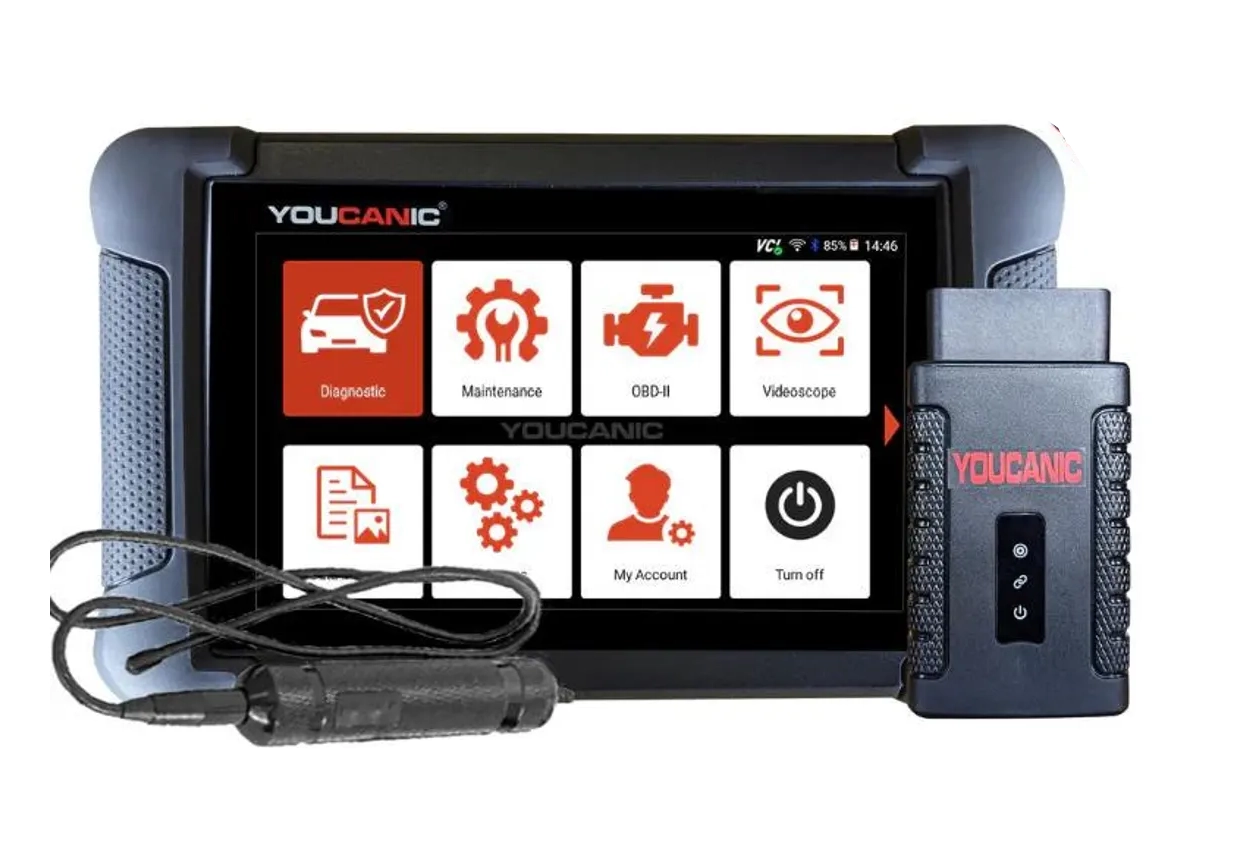
Youcanic UCAN-II full-system 8.4 / 10
full system scanner that works completely without internet connection (except update and setup). Works very good and does service/coding as well.
- ✓Full-system bidirectional
- ✓ECU coding
- ✓Wide vehicle coverage
- ✓Lifetime updates
- ✓Good to check and log live data
- ✓30 days no question asked return
- ✕Less known brand with smaller community


I'm Juraj Lukacko and I work as an auto electrician. On this site I share what I learn from real work on real cars, to help you pick the right tools for diagnostics, programming and tuning and get the job done.
More about me →
Hello. I am having trouble connecting a scanner to my 2000 Jeep Grand Cherokee WJ. The scanner is a Mucar BT200 Pro. When I plug it in, a green light turns on. Then, when I open the app, the light turns blue. I enter my vehicle’s details and attempt to connect; at this point, the light turns light blue, then back to blue, and after a few seconds, it turns off completely. The app displays an error message. Once I close the app, the green light on the scanner comes back on. How can I resolve this issue?
Hello, if the scanner cannot connect to your Jeep, try the following:
1. Make sure the ignition is ON (engine can stay off) when connecting.
2. If you use auto scan / auto VIN, select the brand and model manually instead.
3. If manual selection does not work, try Global or basic OBD (engine only). If that connects, either the Jeep software needs an update or your model is not supported in full system.
4. If basic OBD does not work either, try the Car Scanner app with the same adapter. If Car Scanner connects to the car, the Jeep software needs an update or your model is not supported.
5. If even Car Scanner does not connect, try a different scanner on the car. Since the lights on your adapter come on, power and ground at the OBD port are fine, but there may be a problem with the communication wires to the OBD port.
6. If another scanner works on your car, contact the store you bought the BT200 from and they will help you further.