

Published: February 18, 2026 · Last updated: April 29, 2026
If you swapped the 12V battery in a modern car and didn’t run a battery registration after, the energy management module is still using the old battery’s history to decide how to charge the new one.
The new battery either gets undercharged for years and dies in 18 months instead of 6, or it gets overcharged and gasses out the electrolyte. Either way, what should be a simple swap turns into a slow-rolling failure that catches you off guard a year later.
This guide covers what battery adaptation actually does, how to know if your car needs it, and how to handle the two situations that catch most people out: missing manufacturer codes and Ah values that aren’t in the dropdown.
Need a tool that can do this? Check my best OBD2 scanners for service functions comparison.
What battery adaptation actually does
When you run a registration or BMS reset, the energy management module does several things at once:
- Wipes the old battery’s age counter and resets it to zero
- Clears the last few days of charge/discharge history
- Resets the internal resistance estimate to a nominal value
- Updates the new capacity (Ah) and chemistry (AGM, EFB, flooded)
- On VAG and BMW, stores the new manufacturer code and serial
- Re-arms Stop-Start if it had been disabled
- Rebaselines the open-circuit voltage to SOC mapping
If you skip it, the module keeps applying the old battery’s fingerprint to the new one. The IBS sensor on the negative terminal still measures voltage, current and temperature in real time, but the supervisor is interpreting those numbers against the wrong reference. That’s the whole problem.
How to tell if your car needs it
Three checks. Any single positive means register it.
Visual check at the battery. Look at the negative terminal. If there’s a small black sensor clamped on the negative cable with one or two thin wires running back to the chassis, that’s an IBS (Intelligent Battery Sensor). IBS present = registration required. If it’s just a bare clamp with the heavy ground strap, it’s an old car without BMS and you can skip the whole thing.
Vehicle features. Auto Stop-Start, regenerative braking display, energy gauge in the cluster, AGM or EFB battery from the factory, battery in the trunk or under a seat. Any of these = register.
Brand and chassis. Quick reference, but treat it as a guide not a rule. The definitive test is always the IBS check on the negative terminal. Some early models in these date ranges (especially BMW E46, E39, early E60) shipped without IBS even though the year suggests otherwise.
| Brand | Registration usually needed |
|---|---|
| BMW / MINI | E60, E65, E90 with IBS, all F-chassis and G-chassis. Older E46, E39, E53 no IBS, no registration |
| Mercedes | W211 facelift, W221, W204, W212, W205, W213, W222 onward |
| Audi | A6 C6, A8 D3, Q7 4L, Touareg 7L from mid-2000s, all MQB / MLB from 2010+ |
| VW / Skoda / SEAT | Touareg 7L, Passat B6+ with Stop-Start, all MQB models |
| Volvo | P3 platform 2008+ with BMS, all SPA / CMA |
| Ford | Stop-Start equipped only: Focus Mk3+, Fiesta Mk7+, Kuga Mk2+, Mondeo Mk5, Edge, Transit Mk7+ |
| Vauxhall / Opel | Astra J onward with Stop-Start |
| PSA / Stellantis | 308, 508, 3008, C5 and similar with Stop-Start (~2012+) |
| Hyundai / Kia | Stop-Start models from ~2015+, all E-GMP EVs (Ioniq 5, EV6) |
| Toyota | Almost never. Self-relearns on most ICE models |
| Honda | Almost never. Some hybrids only |
| Mazda | i-Stop self-relearns, no scanner needed |
If you’re unsure about your specific car, the IBS check at the negative terminal beats any table. No sensor on the cable = no registration needed. Sensor present = register it.
When in doubt and the IBS is there, register anyway. Running registration on a car that doesn’t need it does no harm. The routine just returns “not supported” and exits.
Registration vs coding (the difference matters)
Registration / reset. Used when the new battery has the same Ah and chemistry as the old one. Resets age and history. No spec change.
Coding / adaptation. Used when something is different about the new battery. Different capacity, different chemistry (flooded to AGM, or AGM to AGM with different Ah), different manufacturer. You’re telling the car “this is a new spec, use a different charging map.”
After coding, most cars run the registration step automatically.
The general procedure
Same flow on most cars:
- Install battery, clean and tighten terminals, make sure the IBS connector is plugged in
- Hook up a battery maintainer (this matters more than people think; PSA BSI writes will abort under 11.5V)
- Ignition ON, engine OFF
- Connect scanner, navigate to the battery service function (names vary: Battery Reset, Battery Registration, BMS Reset, Battery Adaptation)
- Enter battery info if asked: chemistry, capacity, manufacturer code, serial
- Confirm. Don’t turn ignition off during the write
- After it finishes, ignition OFF for 30 seconds, start the engine, drive 30 minutes mixed so the BMS can build a fresh history
That’s it. The brand-specific menu paths differ but the sequence is always the same.
Real procedures (BMS registration examples)
Below you’ll find real step-by-step procedures for battery registration and BMS reset on specific vehicles. These guides show exact menu paths, supported tools, and real diagnostic workflows.
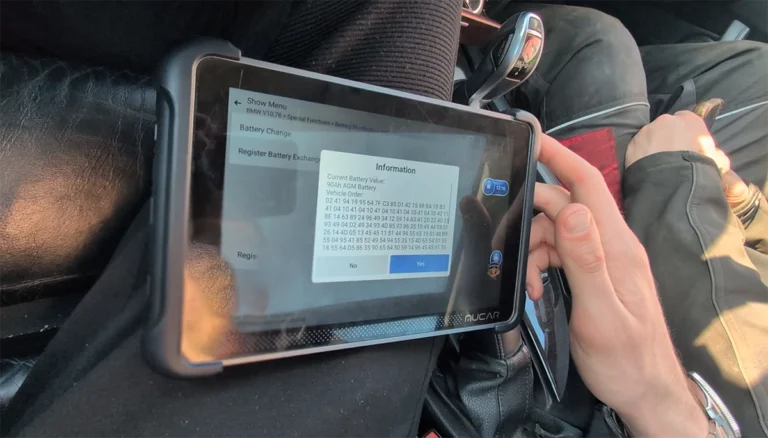
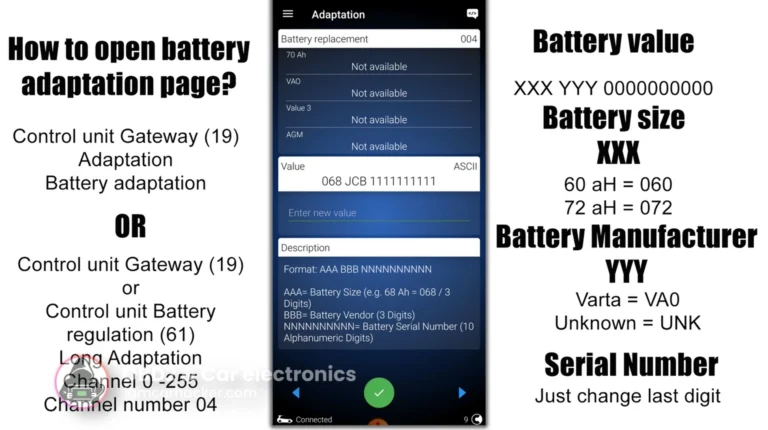
What gets you stuck (and how to fix it)
These are the two cases that catch almost everyone who tries this for the first time.
Your battery brand isn’t in the VAG dropdown
VAG cars want a 3-letter manufacturer code (VA0 = Varta, BCH = Bosch, EXD = Exide, BAS = Banner, JCB = Johnson Controls, MLA = Moll, CTC = Centra, ATL = Atlas) plus a 10-digit serial. If you bought a smaller-brand battery without a recognizable code printed on the label, here’s what to do.
What actually matters, in order:
- Chemistry must match exactly. This sets the charge voltage. Get this wrong and you’ll cook the battery in months.
- Capacity (Ah) within 5-10 Ah is fine. Big mismatches are not.
- Manufacturer code. The BMS uses this for warranty tracking and minor charge curve fine-tuning. It doesn’t really change behavior much.
- Serial number. Just a trigger. Any change of any digit forces a counter reset. The number itself means nothing to the charging.
So: pick the closest manufacturer code your tool offers. If your brand isn’t listed, use Varta (VA0) as a universal fallback. Ross-Tech specifically recommends this when MLB gateways reject other codes (“we recommend using Varta so the control module will accept the new value”). Then change one digit of the serial so it’s different from the old one. Save. Done.
VARTA and Banner both confirm in their own service literature that aftermarket batteries without an OE code work fine after registration this way. The car learns the new battery’s characteristics over a few drive cycles.
Your Ah value isn’t in the BMW dropdown
This one bit me. BMW dropdowns offer 70, 80, 90, 100, 105 Ah. You install a 95 or 96 Ah battery (Yuasa H8, Bosch S5, Varta Silver Dynamic) and there’s no token for it.
Round down. Always round down.
Choose 90 Ah for a 95 or 96 Ah battery. Here’s why:
- Telling the BMS your battery is 90 Ah when it’s actually 96 Ah means the BMS thinks it’s lower-capacity than reality. It charges slightly conservatively. The car triggers Stop-Start lockout and load shedding a bit early. Conservative behavior, no damage.
- Telling the BMS your battery is 100 Ah when it’s actually 96 Ah is the opposite. The BMS uses a charge profile calibrated for a bigger cell. The 96 Ah cell spends more time near gassing voltage, especially on AGM. Electrolyte dries out, valves vent, capacity drops. Battery dies early.
Same rule applies on Ford, Volvo, VAG, anywhere a dropdown forces you to pick a value that doesn’t match exactly. Round down.
Wrong chemistry coded (don’t do this)
The fastest way to destroy a brand new battery in 90 days. Set the chemistry exactly to what’s printed on the case.
- Flooded coded as AGM = the BMS uses 14.6-14.8V, the flooded cell gasses, water boils off, dead in 6 months
- AGM coded as flooded = chronic undercharge, sulfation, AGM dies in 12-24 months instead of 6 years
Always match what’s printed on the new battery. Not what was on the old one.
A few practical things that save time
- Photograph the old battery sticker before pulling it. Ah, CCA, OE part number, manufacturer code, serial. Single most useful preventive step.
- Register immediately, before driving. No catastrophe if you wait a few days, but every drive on the wrong fingerprint is a drive of incorrect charging.
- BMW with battery in the trunk: never charge directly on the negative post. The IBS sits on the negative cable and won’t see the current. Use the hood jump post and chassis ground bolt instead.
- VAG SFD-locked cars (Golf 8, Octavia IV, A3 8Y, Q4) need an SFD unlock token before the gateway adaptation will accept writes. OBDeleven Pro fetches it automatically. VCDS needs a dealer geko token.
- Drive 30 minutes mixed afterward so the IBS gathers a fresh resting voltage histogram and the BMS locks onto the new fingerprint.
Tools that can do it
Basic ELM327 dongles can’t. You need something with bidirectional service functions for your specific brand. Quick orientation:
- VAG only: VCDS or OBDeleven Pro
- BMW only: BimmerLink + BimmerCode (the combo) or Foxwell NT530 with BMW pack
- Mercedes only: Carly Mercedes or XENTRY
- Ford only: FORScan with extended licence
- Multi-brand DIY: Foxwell NT530 with packs, Launch CRP919X, Autel MK808S, Mucar 892BT, Topdon Phoenix Lite
- Multi-brand pro: Autel MaxiSys MS906 Pro, Launch X431 PRO5, Autel IM608
For a full breakdown by brand and tier with honest pros and cons, see my best OBD2 scanners for service functions review.
Bottom line
If your car has an IBS sensor on the negative terminal, register the battery. Match chemistry exactly. Round down on unlisted Ah values. Use Varta as a fallback manufacturer code on VAG when your brand isn’t listed. Drive 30 minutes after to let the system relearn.
Five minutes of work that doubles the new battery’s life.
Most popular OBD2 guides








Hi, I am Juraj Lukacko. I got frustrated by unhelpful and scammy mechanics, so I decided to learn everything about car diagnostics myself. I test dozens of new car diagnostic tools every month along with learning new strategies to fix and customize cars.
