
How to check diesel fuel injectors on BMW E46 using OBD2 scanner
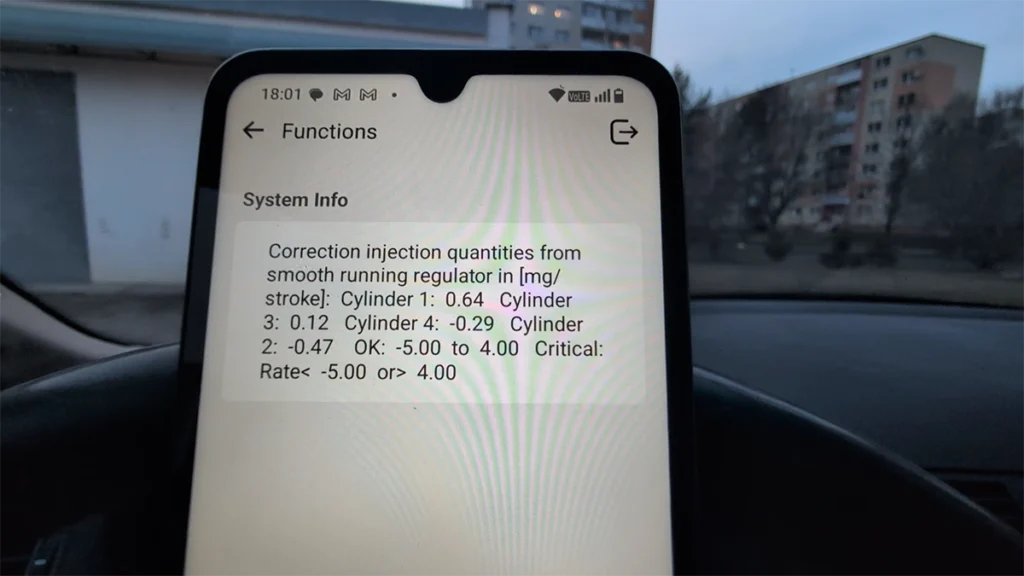
This guide shows how to check diesel fuel injectors on BMW E46 by reading injector correction values (smooth running control) using an OBD2 scanner.
Affiliate Disclosure: iamcarhacker.com is an Amazon and other affiliate programs Associate. As an Amazon Associate, I earn from qualifying purchases. Full Affiliate disclosure.
Used tool in this guide

Supported vehicles
| Vehicle |
|---|
| 3-series-e46 |
Technical overview
| Item | Details |
|---|---|
| Vehicle | BMW 3 Series (E46) |
| Year | 2005 |
| System | Engine (DDE – diesel ECU) |
| Procedure type | Diagnostics / Live data |
| Difficulty | Easy |
| Time required | ~2–5 minutes |
| Prerequisites | Engine at operating temperature recommended |
Step-by-step procedure
1. Connect diagnostic tool
- Plug in your OBD2 scanner
- Turn ignition ON
- Start engine (recommended for accurate values)
2. Navigate to correct menu (IMPORTANT)
Using Thinkdiag2:
BMW → Special Functions → Smooth Running Control
⚠️ This is key:
- Values are often NOT in standard live data
- You must go through Special Functions
3. Confirm DTC check
- Tool may ask to check or clear fault codes
- Confirm and continue
4. Display injector values
- Select Show values
You will now see:
- Injector correction values (mg/stroke)
- One value per cylinder
5. Evaluate values at idle
Typical reading example:
- Cylinder 1: +0.5
- Cylinder 2: -0.8
- Cylinder 3: +0.3
- Cylinder 4: -0.2
👉 Ideal values:
- Close to 0 mg/stroke
Recommended interpretation:
- ±1 mg/stroke → excellent
- ±2 mg/stroke → acceptable
- ±3–4 mg/stroke → warning zone
6. Rev the engine
- Lightly rev engine (1500–2500 RPM)
- Observe changes
👉 Healthy injectors:
- Values remain stable
- Stay close to zero
7. Evaluate overall engine behavior
Combine scanner data with:
- Smooth idle
- Smooth driving
- No misfires
Video: How to check diesel injectors BMW E46
This video shows how to access injector values using different scanners and where to find smooth running control data, even when it is hidden.
Additional Information & Compatibility Notes
- Some scanners cannot access injector correction values
- Even within the same tool:
- Live data may NOT show injectors
- Special functions are required
👉 From testing:
- Thinkdiag2 → works via Smooth Running Control
- Some tools (like Mucar 682 models) may NOT show values
- Mucar 892BT → confirmed working
Before using or purchasing any diagnostic tool for this procedure, always verify compatibility with your exact vehicle model, year and system configuration. Supported functions may vary depending on software version, hardware revision and regional limitations.
Important diagnostic note
❗ Do NOT rely only on injector values
High correction values do NOT always mean bad injectors.
Possible causes:
- Low engine compression (e.g. bent valves)
- Vacuum leak
- Faulty MAF sensor
- Fuel system issues
👉 Injectors often only compensate another problem
Alternative tools
Related guides & background information
Legal & safety notice
This procedure modifies vehicle system settings through the control module. Incorrect use may cause faults or warning lights. Always ensure the vehicle is secured and follow proper safety procedures.
More procedures like this
Popular OBD2 guides
See all guides
Best OBD2 scanners in 2025
I constantly test new OBD-II scanners to give you the best options possible. Here is a full list of the best tools in all categories currently.

Hi, I am Juraj Lukacko. I got frustrated by unhelpful and scammy mechanics, so I decided to learn everything about car diagnostics myself. I test dozens of new car diagnostic tools every month along with learning new strategies to fix and customize cars.

Responses