
When buying a used car there is always one important question:
Are the kilometers on the dashboard real?
Odometer rollback is still one of the most common frauds in the used car market. Many buyers rely only on the instrument cluster, but modern vehicles store mileage information in several control modules.
With the right OBD2 scanner you can often find:
- hidden mileage records stored in ECUs
- historical mileage snapshots
- engine operating hours
- inconsistencies between different control modules
Comparing this information can reveal whether the displayed mileage is realistic.
In this guide I will explain how mileage verification works, where to find these records and how to interpret the data.
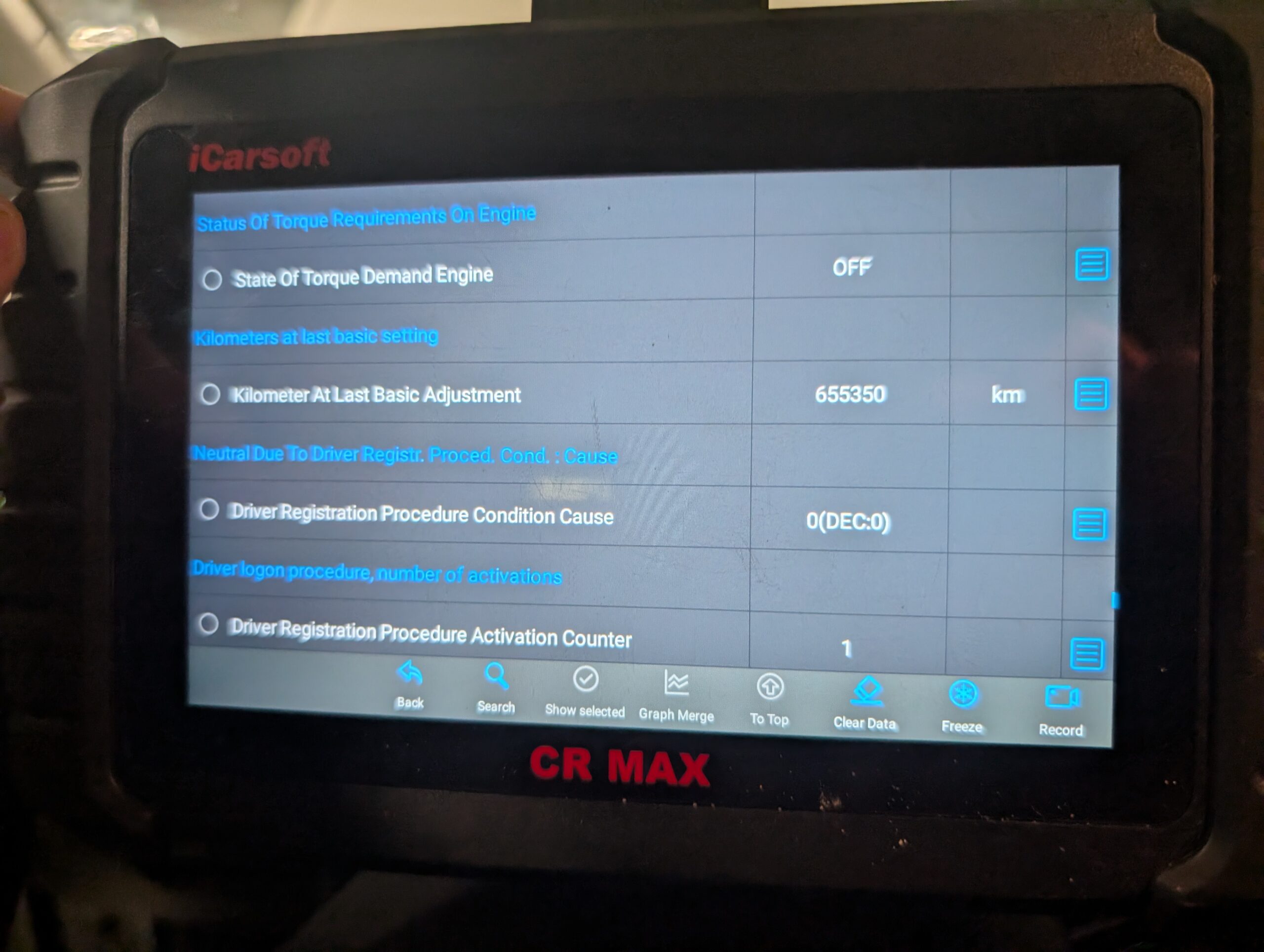
We will also look at a real diagnostic case study from a Skoda Octavia Mk3 where the transmission ECU showed over 600,000 km, while the dashboard displayed only 215,000 km.
How mileage verification with an OBD2 scanner works
Modern vehicles contain dozens of electronic control modules.
Some of the most common ones include:
- engine control module
- ABS module
- body control module
- steering module
- infotainment system
- transmission control unit
Certain modules store mileage information for diagnostics, fault events or service records.
When performing a mileage check, the main idea is simple:
Compare mileage values stored in different ECUs.
If all modules show values close to the dashboard mileage, the odometer is usually genuine.
If one module shows a significantly higher value, it may indicate:
- odometer rollback
- replaced instrument cluster
- replaced control module
- corrupted ECU data
Important limitation of OBD2 mileage checks
Mileage verification does not work on every car.
Manufacturers store diagnostic data differently and some vehicles do not store mileage anywhere outside the instrument cluster.
A general rule is that newer cars have a higher chance of storing multiple mileage records.
| Vehicle age | Chance of finding mileage data |
|---|---|
| Before 2010 | Low |
| 2010–2015 | Medium |
| 2015+ | High |
On many vehicles produced after 2015 it is common to find mileage records in several modules.
Older vehicles often do not store any additional data.
Step-by-step method to verify mileage
Connect the diagnostic scanner
Start by connecting a scanner that supports full system diagnostics. This allows access to all control modules in the vehicle.
Basic code readers usually cannot access all modules, so they are not suitable for this type of inspection.
Open control modules one by one
Mileage records can appear in different modules depending on the manufacturer.
Common places where mileage data can appear include:
- engine ECU
- ABS module
- transmission ECU
- infotainment or navigation module
- body control module
Each module may store the value under a different name.
Search live data for mileage values
Open live data and search for parameters such as:
- mileage
- distance
- distance driven
- odometer
- distance counter
Some scanners allow searching directly in the data stream, which makes this much easier.
If the scanner does not have search, you may need to scroll through the data manually.
Compare values with dashboard mileage
Once you find mileage records, compare them with the value displayed on the dashboard.
Example of consistent values:
| Source | Mileage |
|---|---|
| Dashboard | 215,553 km |
| Climate control module | 215,476 km |
| Steering module | 215,476 km |
| Infotainment system | 215,550 km |
Values like this strongly suggest that the mileage is genuine.
If one module shows significantly higher mileage than the dashboard, it may indicate manipulation.
Using engine operating hours to detect suspicious mileage
If you cannot find mileage records, another useful parameter is engine operating hours.
Many control modules store the total time the engine has been running.
By comparing engine hours with mileage you can estimate the average speed of the vehicle.
Example:
| Parameter | Value |
|---|---|
| Mileage | 215,553 km |
| Engine operating hours | 3036 h |
Average speed calculation:
215,553 km ÷ 3036 h ≈ 71 km/h
This is a realistic value for a diesel car used in mixed driving conditions.
If the same car showed extremely high engine hours with low mileage, it would raise suspicion.
This method is not perfect, but it can provide additional clues when other mileage records are not available.
Real case study: DSG transmission showing 600,000 km
During a used car inspection of a Skoda Octavia Mk3 2.0 TDI DSG, we discovered something unusual.
The DSG transmission ECU reported a value of roughly 600,000 km, while the dashboard odometer showed only about 215,000 km.
At first glance this looked like a typical odometer rollback situation.
Instead of assuming fraud immediately, we decided to analyze data from multiple control modules.
Vehicle overview
| Item | Details |
|---|---|
| Vehicle | Skoda Octavia Mk3 |
| Engine | 2.0 TDI |
| Transmission | DSG |
| Model year | ~2020 |
| Dashboard mileage | 215,553 km |
Mileage values stored in other control modules
| Module | Stored mileage |
|---|---|
| Climate Control | 215,476 km |
| Central Electronics | 215,476 km |
| Steering Column Lock | 215,476 km |
| Power Steering | 215,476 km |
| Parking Assist | 215,476 km |
| Infotainment | 215,550 km |
All modules reported mileage very close to the dashboard value.
This strongly suggested that the odometer reading was genuine.
Transmission data that triggered suspicion
| Parameter | Value |
|---|---|
| Snapshot mileage | 187,530 km |
| Kilometer at last basic adjustment | 655,350 km |
| Gearbox mileage | -59,092,992 km |
| Engagement counter | 2,147,483,647 |
The value 655,350 km looked alarming at first.
However the other parameters clearly showed corrupted transmission counters.
For example the engagement counter showed 2,147,483,647, which is the maximum value of a signed 32-bit integer. This usually indicates counter overflow rather than real data.
Engine operating hours verification
The engine ECU reported approximately 3036 operating hours.
Average speed calculation:
215,553 km ÷ 3036 h ≈ 71 km/h
This is perfectly realistic for a diesel vehicle.
If the car had actually driven 600,000 km, the engine hours would have been significantly higher.
Final conclusion from the case study
Despite the suspicious DSG value, all other ECU data pointed to the same conclusion.
Mileage values across modules were consistent, historical records increased logically and engine hours matched the expected usage.
The most likely explanation was corrupted transmission counters rather than odometer rollback.
You can read the full diagnostic analysis here.
Best OBD2 scanners for mileage verification
To perform this type of inspection you need a scanner that can:
- access all control modules
- read live data from each ECU
- allow searching within data streams
Basic code readers usually cannot perform these tasks.
For recommendations see my updated guide:
Best OBD2 scanners for mileage check
Related mileage inspection procedures
Below are real diagnostic procedures where mileage data was analyzed using OBD2 scanners.
Final thoughts
Mileage verification with an OBD2 scanner is not perfect, but it can reveal a surprising amount of hidden information.
Sometimes you will find direct mileage records stored in control modules. Other times you may need to rely on indirect indicators such as engine operating hours or historical event snapshots.
In many cases this information can help you detect odometer rollback, negotiate a better price when buying a used car or simply gain more confidence about the vehicle’s history.
Learning how to analyze ECU data is one of the most useful skills when inspecting modern vehicles.
